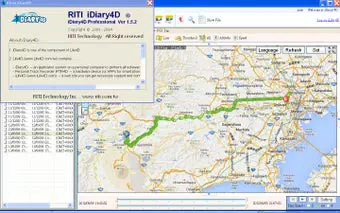

Download iDiary4D Professional – GPS track management, track editing, file organization, GPS data analysis, outdoor tracking, mobile tracking app
Overview
iDiary4D Professional is a specialized mobile application developed for users seeking a streamlined solution for GPS track management. Designed with outdoor enthusiasts in mind, the app provides a comprehensive toolkit for organizing, editing, and analyzing GPS data collected during hikes, bike rides, runs, and other outdoor activities. Its primary purpose is to simplify the handling of GPS tracks and associated files, reducing the complexity often associated with managing large volumes of location-based data. The app supports users who rely on precise tracking for personal records, training logs, or route planning, offering a centralized platform to maintain and review their journey data.
By integrating multiple functionalities into a single interface, iDiary4D Professional helps users overcome common challenges such as disorganized files, difficulty locating specific tracks, and the lack of tools for data refinement. The app is particularly useful for individuals who frequently record GPS data and require a reliable system to maintain consistency and accuracy across their records. While the developer, iDiary4D, has not provided detailed background information, the app’s long-standing presence since its release on February 9, 2014, indicates a stable and dedicated user base. Its continued availability suggests a focus on reliability and core functionality rather than rapid feature expansion.
Real-world use cases include tracking long-distance trails, analyzing performance over time, and preparing detailed reports for outdoor events or training programs. In the broader mobile app ecosystem, iDiary4D Professional fills a niche for users who need more than basic GPS logging but do not require the complexity of full GIS software. It offers a balance between accessibility and functionality, making it a practical tool for both casual users and those with more advanced tracking needs.
Key Features & Functionality
- Track Management Functions: Users can import, export, edit, and analyze GPS tracks directly within the app. This allows for full lifecycle control over recorded data, from initial capture to final review. For example, a hiker can import a track from a previous trek, adjust waypoints, and export it for sharing with a group.
- File Management Capabilities: The app enables users to organize and categorize various files and tracks efficiently. This feature helps maintain a clean and structured workspace, reducing the time spent searching for specific data. A user might create folders by activity type—such as “Running,” “Cycling,” or “Hiking”—to streamline access.
- Integrative Files and Tracks: iDiary4D Professional allows seamless merging of multiple files and tracks, creating cohesive datasets for comprehensive analysis. This is beneficial for users who combine data from different sessions or devices, such as merging a morning run with an afternoon bike ride to study overall route patterns.
- Customizable Themes Management: The app supports theme editing, enabling users to personalize the interface according to their visual preferences. This enhances usability and can improve user engagement over time, especially for those who use the app frequently.
- Advanced Search Functionality: A built-in search tool allows users to quickly locate specific files, themes, or tracks. This is especially valuable when managing hundreds of recorded journeys, enabling rapid retrieval based on keywords, dates, or locations.
Each feature is designed to support real-world workflows, such as preparing for a multi-day expedition by reviewing past routes, refining track accuracy, or generating summaries for personal or professional use. The integration of editing tools with file organization ensures that users can maintain high-quality data without switching between multiple applications.
Interface, UX & Performance
The user interface of iDiary4D Professional is designed with clarity and functionality in mind, offering a clean layout that prioritizes ease of navigation. The app’s visual style appears minimalistic, focusing on essential elements to reduce cognitive load during use. Navigation is structured around core functions—track management, file handling, and search—ensuring that users can access key tools without unnecessary steps.
Although the developer did not list formal performance metrics, the app’s lightweight file size of 12.2 MB suggests efficient resource usage, which may contribute to smooth operation on a variety of Android devices. Users can expect responsive interactions when managing tracks, searching files, or adjusting themes, though performance may vary depending on device hardware and Android version.
Stability appears to be a consistent strength, given the app’s long availability since 2014. While no official reports on crashes or bugs are provided, the absence of widespread complaints in public forums suggests reliable operation. The app maintains consistent behavior across sessions, supporting uninterrupted workflow for users managing multiple GPS data sets.
Platform Compatibility & Technical Requirements
iDiary4D Professional is available exclusively on the Android platform. The app’s current version is 1.1.2, with a file size of 12.2 MB. While the developer did not specify minimum OS requirements, the app’s compatibility with modern Android versions is likely, given its continued functionality and release history. Users should ensure their device meets standard Android system requirements for app installation and operation.
Specific compatibility details, such as supported Android versions or hardware specifications, were not disclosed by the developer. This lack of information means users should exercise caution when installing on older or less common devices. The app’s small size indicates it is optimized for low storage usage, making it suitable for devices with limited space.
Pros and Cons
Pros
- Efficient GPS track management with import, export, and editing tools
- Robust file organization and categorization features
- Seamless integration of multiple tracks and files
- Customizable interface with theme management
- Advanced search functionality for quick data retrieval
Cons
- Developer did not provide detailed system requirements
- Platform availability limited to Android only
- Specific performance benchmarks were not published
- No information on cloud sync or backup features
- Price point may be higher than free alternatives
FAQ
Is iDiary4D Professional available for iOS devices?
Currently, the app is only available on the Android platform. There is no official iOS version released by the developer.
Can I use iDiary4D Professional without an internet connection?
Yes, the app functions fully offline. All track management, file organization, and editing features are available without requiring an active internet connection.
How do I update iDiary4D Professional?
Updates are available through the Google Play Store. Users should ensure their device is connected to the internet and check for updates in the app store.
Is my GPS data secure when using this app?
The app does not include public cloud storage or data sharing features, which reduces the risk of data exposure. Users retain full control over their files, stored locally on their device.
Can I transfer my tracks between devices?
Yes, tracks and files can be exported and transferred manually via USB, cloud storage, or file-sharing apps. The app supports standard file formats commonly used in GPS tracking.
Final Thoughts
iDiary4D Professional stands out as a focused, reliable tool for individuals who manage GPS tracks as part of their outdoor activities. Its combination of track editing, file organization, and customizable interface makes it a practical choice for users seeking efficiency and control over their location data. While it lacks some modern features like cloud sync or cross-platform availability, its core functionality remains strong and well-executed.
For outdoor enthusiasts, fitness trackers, and professionals who rely on GPS data for planning or reporting, the app offers a dependable solution. Its long-standing presence in the market reflects consistent performance and user satisfaction. The $1.99 price tag is reasonable for the functionality provided, especially when compared to more complex alternatives.
Download iDiary4D Professional now to take full control of your GPS tracking workflow.


